Imglarger logo

Imglarger

AI-powered image upscaling and editing in a single web platform.

Listed:Dec 19, 2025
Platform:
Web
Share:
Imglarger

Imglarger Introduction

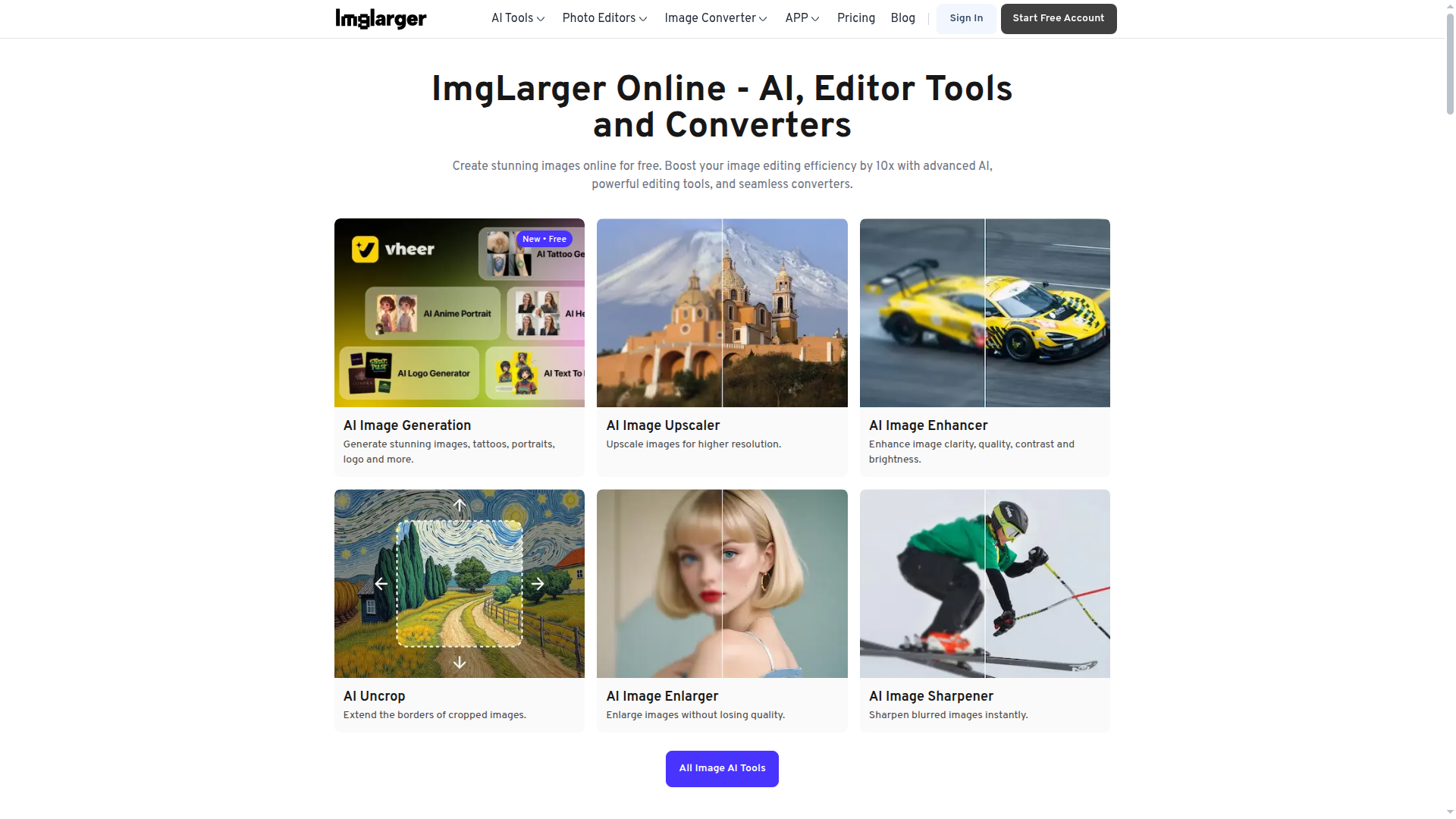
Imglarger is an AI-powered platform for enlarging, enhancing, and editing images. It combines upscaling, sharpening, denoising, restoration, and format conversion into a single online tool, helping you optimize photos quickly without sacrificing quality.

Key benefits include:

  • Comprehensive AI toolset: Includes AI Image Enlarger, AI Image Enhancer, AI Image Editor, AI Image Denoiser, AI Background Remover, AI Cartoonizer, and more for versatile image improvements.
  • Batch processing: Resize or process multiple images efficiently to streamline workflows.
  • Format flexibility: Supports JPG, PNG, WEBP and other common formats for broad compatibility.
  • Freemium access: Free tier with premium upgrades to unlock advanced features and higher limits.
  • User-friendly interface: Designed for photographers, designers, and content creators to deliver high-quality results quickly.

Perfect for photographers, designers, marketers, and content creators who need high-quality image improvements without complex workflows.


Summary

Imglarger is an AI-driven image upscaling and editing platform offering enlargement, enhancement, denoising, colorization, and more in a freemium Web service.

Key Features

  • AI Image Enlarger
  • AI Image Enhancer
  • AI Image Editor
  • AI Image Denoiser
  • AI Background Remover
  • AI Cartoonizer
  • Image Upscaler
  • Batch Image Resize
  • AI Portrait Retouch
  • AI Photo Restoration
  • AI Old Photo Repair
  • AI Photo Colorizer
  • AI Uncrop

Benefits

  • Easy-to-use interface with AI-powered results.
  • High-quality upscaling and enhancement without visible artifacts.
  • Multiple tools in a single platform for varied workflows.
  • Support for common image formats like JPG, PNG, and WEBP.
  • Freemium access with optional premium upgrades for advanced features.
  • Batch processing to handle multiple images efficiently.

Use Cases

  • Upscale low-resolution photos for print, web, or e-commerce.
  • Restore and revitalize old photos with restoration and colorization.
  • Remove backgrounds for product photography and catalog imagery.
  • Cartoonize or stylize images for social media and branding.
  • Sharpen blurry images to improve clarity in portraits and scenes.
  • Batch resize images for marketing campaigns and galleries.
  • Enhance product imagery for ecommerce listings.
  • Retouch portraits for professional headshots.
  • Convert and optimize images to WebP for faster webpages.
  • Repair damaged photos and improve overall visual quality.

How to Use Imglarger

  1. Visit the Imglarger website.
  2. Upload the image you want to enlarge, enhance, or edit.
  3. Select the desired tool (e.g., AI Image Enlarger, Denoiser, Background Remover).
  4. Adjust any available settings and preview results.
  5. Download the enhanced image in your preferred format.

Who Will Use Imglarger

  • Photographers
  • Graphic Designers
  • Social Media Managers
  • Content Creators
  • Marketing Teams
  • E-commerce Businesses

Alternative tools

HIX AI

Free AI chat, image, music & video tools in one freemium platform for creators.

GirlfriendGPT

Create your AI dream girl - design the perfect AI girlfriend for you

NanoBanana AI

Create stunning images with Google's AI model — fast, flexible, and easy.

Motion

The AI-powered SuperApp for Work – AI-driven project, task, calendar, and meeting management in one.

Toolsaday AI

Toolsaday AI: Automate tasks with AI to boost productivity and streamline your workflows.

Roboflow

Computer vision tools for developers and enterprises

QuillBot

AI-powered writing assistant for paraphrasing, grammar, and summarization—across web and browser extensions.

Phrasly

Write naturally, without fear of detection.

Free
OpenRouter

Harness the power of multiple AI models in one place.

LOVO AI Voice Generator

Turn text into natural-sounding speech with 500+ voices, live cloning, and video-ready outputs.